Table of Contents
ToggleThe home office has become a permanent fixture for millions of workers, but a cramped desk surrounded by clutter can kill productivity and motivation. A standing desk with storage solves two problems at once: it gets you moving throughout the day while keeping your workspace organized and within arm’s reach. Unlike a basic standing desk that leaves you scrambling for drawer space elsewhere, a model with built-in storage consolidates your work setup into one cohesive unit. Whether you’re squeezing into a corner bedroom or claiming a dedicated office space, this hybrid solution offers flexibility, health benefits, and the practical storage that remote workers actually need.
Key Takeaways
- A standing desk with storage eliminates clutter while promoting movement and reducing health issues like back pain, poor circulation, and eye strain linked to prolonged sitting.
- Standing desks should have electric motors with preset height buttons and a range of 28–30 inches for sitting to 38–48 inches for standing, with a weight capacity of at least 200–300 pounds for real-world use.
- Storage options like drawers, shelves, and cubbies should be organized by frequency of use, with daily items closest to your seat and rarely used supplies moved to separate storage outside the desk.
- L-shaped and U-shaped standing desk models maximize workspace for multiple monitors and fit awkwardly sized corners, while compact single-surface designs work best for tight bedrooms and provide flexibility for renters.
- Mid-range standing desks with storage ($400–$800) offer the best balance between cost and longevity, combining electric motors, quality materials, and better build quality than budget models.
- Positioning your monitor at arm’s length with an adjustable monitor arm, labeling cables, and using a timer to switch positions every 20–30 minutes ensures you maximize both ergonomic and productivity benefits.
Why Standing Desks With Built-In Storage Are Game-Changers
Sitting for eight hours straight isn’t just uncomfortable, it’s linked to back pain, poor circulation, and eye strain. Standing desks encourage movement and postural variation, and adding storage to the mix eliminates the excuse to keep a cluttered surface. You’re not hunting through filing cabinets across the room or stacking papers on the floor.
The health argument is straightforward: alternating between sitting and standing reduces the strain on your spine and engages your core muscles naturally. Most occupational health studies recommend switching positions every 20–30 minutes. But the real win is the space efficiency. A standing desk with drawers, shelves, or cubbies keeps your pens, notepads, chargers, and reference materials within a few inches of your keyboard. Your brain registers less visual chaos, which improves focus.
For home office setups where square footage is precious, a single integrated unit beats buying a desk, a filing cabinet, and a monitor stand separately. You save money, floor space, and the frustration of mismatched furniture pieces. Many models also come with cable management built in, hiding power strips and USB cables so your workspace looks intentional, not like a tech graveyard.
Key Features To Look For In A Standing Desk With Storage
Not all standing desks with storage are built the same. Before ordering online or hitting the showroom, nail down what actually matters for your workflow and space.
Height Adjustability And Weight Capacity
If you’re going to alternate between sitting and standing, your desk must adjust smoothly and hold its height without drifting back down (called “settling”). Electric motors are the gold standard: they’re quiet, precise, and fast. Look for models with preset height buttons, one for sitting, one for standing, so you’re not hunting for the perfect position every time you switch.
Height range matters too. A desk should drop low enough for comfortable sitting (typically 28–30 inches) and rise high enough for standing without hunching (usually 38–48 inches, depending on your height and monitor setup). Check the spec sheet carefully: “nominal” ranges can be misleading if the motor doesn’t deliver the full travel.
Weight capacity isn’t just about your monitor and keyboard. Add the desk’s own weight, your stored supplies, and maybe a printer, and you could easily hit 150–200 pounds. Most quality standing desks with storage handle 200–300 pounds, but bargain models might cap out at 100 pounds and sag under real-world use. Read reviews from people with similar gear loads before committing.
Storage Options And Organization Solutions
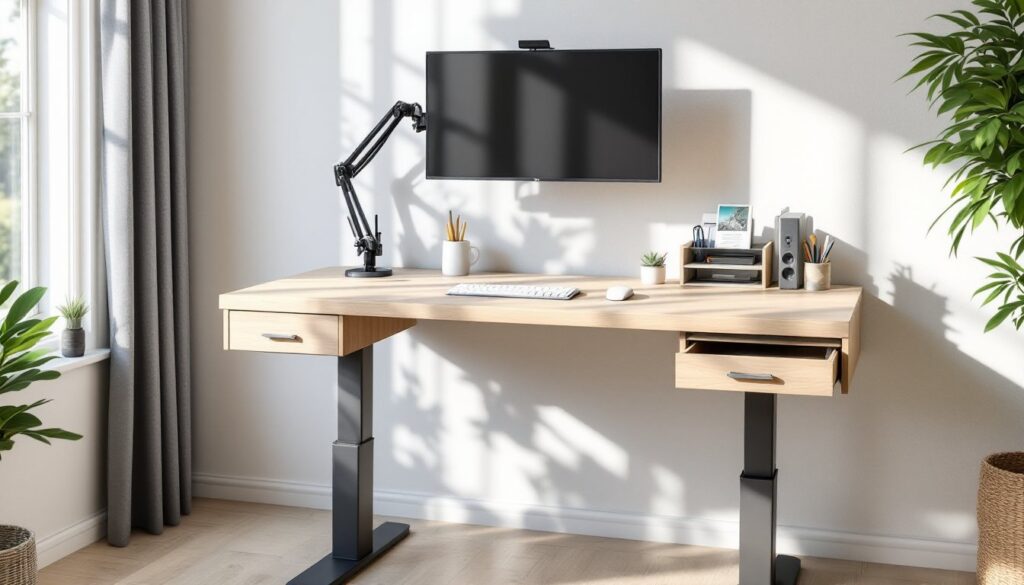
Storage comes in three basic flavors: drawers, open shelves, and cubbies. Drawers keep dust and clutter out of sight, great if you work on video calls or want a clean desktop look. Drawers do eat into legroom, though, so measure your knee clearance before buying. Open shelves are flexible and let you grab items fast, but they demand regular tidying to avoid looking sloppy.
Cubbies and modular storage offer a middle ground. Smaller cubbies work well for file folders, while deeper ones can hold a small printer or external hard drive. Look for adjustable shelving so you can reconfigure as your needs change. Some models include a pegboard or accessory rail for hanging headphones, a desk lamp, or a monitor arm.
Consider cable management and cord organization too. A desk with channels or clips under the surface keeps cables from becoming a tangled mess, and a power strip inside a drawer or hidden compartment prevents the “rats nest” look. If you’re using multiple monitors, a document holder, or a lamp, those cord pathways will save hours of frustration.
Top Standing Desk With Storage Styles For Every Home Office
Standing desks with storage span several styles, from industrial to minimalist, so you can match your decor.
L-shaped or U-shaped models give you maximum surface area for dual monitors, notebooks, and a phone stand. The corner configuration fits snugly against two walls, making smart use of awkward spaces. Storage typically runs along the back edge or side, so it doesn’t block legroom. These are ideal if you need real square footage to spread out, though they’re bulkier to move.
Compact single-surface desks with a small drawer stack or shelving unit are perfect for tight bedrooms or alcoves. You lose work surface compared to an L-shape, but you gain flexibility. These models often weigh less and fit into smaller footprints, making them suitable for renters or anyone who might relocate.
Rustic or industrial styles combine wood (often reclaimed or stained hardwood) with steel frames or brackets. They look substantial and handmade, fitting beautifully in studios with exposed brick or vintage decor. Metal frames provide excellent stability even at full height extension. Drawers and shelves often feature quality hardware and real joinery rather than particleboard and plastic clips.
Minimalist designs emphasize clean lines, light finishes (white, natural wood, or light gray), and hidden storage. Cable management is slick, and surfaces stay clutter-free. These integrate easily into modern or Scandinavian-inspired spaces and make a room feel larger. Many use sliding drawers or flip-up compartments to hide supplies without visible hardware.
Budget matters too. Entry-level models (under $400) typically use veneer or particleboard and manual height adjustment. Mid-range ($400–$800) offer electric motors, solid wood or quality plywood, and better build quality. Premium models ($800+) add real wood surfaces, advanced storage features, and warranties that reflect the investment. For a home office that’ll see heavy daily use, mid-range usually hits the sweet spot between cost and longevity.
Maximizing Your Workspace: Setup Tips And Best Practices
Buying the desk is just the start. How you set it up and organize it determines whether it becomes a productivity hub or an expensive paperweight.
Begin with acclimation and measurement. If your desk arrives flat-packed (most do), let the wood or veneered surfaces acclimate to your room’s humidity for 24–48 hours before assembly. This prevents warping or joint gaps later. Measure your doorway, stairwell, and final placement spot carefully, a six-foot desk won’t fit if your hallway is only five feet wide, and you can’t return it after delivery.
Assemble on a clean, level surface using the hardware provided. Don’t substitute bolts or skip washers to “save time.” An undersized fastener or missing backing plate can cause wobble or motor failure later. Check that the desktop is level before tightening everything: shims or adjustable feet matter more than you’d think.
Once assembled, organize storage based on frequency of use. Daily items, pens, notepads, phone charger, headphones, go in the drawer closest to your seat or on the nearest shelf. Weekly or monthly supplies (extra paper, file folders, toner cartridges) go deeper into storage. Rarely used items stay in a separate cabinet or closet, not taking up prime desk real estate.
Use drawer dividers or small bins to prevent supplies from sliding around every time you adjust the desk height. A pen holder, cable organizer, or filing tray keeps everything from becoming a jumbled mess. This is where smart storage solutions save the day by creating zones and preventing clutter from multiplying.
Position your monitor at arm’s length and slightly below eye level, not on top of the desk where you’ll hunch forward. An adjustable monitor arm mounted to the desk frees up surface space and lets you dial in ergonomics. Your keyboard and mouse should be at elbow height whether sitting or standing, which is another reason preset height buttons matter.
Cable management deserves its own step. Run cables behind the desk or through management clips, and label them at both ends so you know what plugs into what. A power strip with an on/off switch stored inside a drawer or mounted to the underside of the desk keeps the outlet tidy.
If you’re planning to build or customize a standing desk, sites like Instructables offer detailed woodworking plans and step-by-step assembly guides. For those wanting inspiration or modified designs, standing desks with integrated storage sometimes include free plans that you can adapt to your space. Beginner-friendly DIY approaches also appear on The Handyman’s Daughter, where you’ll find tutorials for building or upgrading furniture pieces.
Finally, treat your standing desk as a working tool, not furniture to admire from a distance. Keep the surface clear of non-work items (coffee cups belong on a side table, not nestled between your keyboard and monitor). Set a phone timer or use a standing desk app to remind you to switch positions every 20–30 minutes. The health and productivity benefits only kick in if you actually use the height adjustment feature.
Conclusion
A standing desk with storage eliminates the false choice between a healthy workspace and an organized one. By consolidating your work surface, movement, and storage into a single integrated unit, you’re investing in both your health and your home office’s function. Take time to assess your actual needs, height range, weight capacity, storage type, before buying. The right model will feel indispensable within weeks, keeping you moving, focused, and clutter-free for years to come.